
RebelMouse is a community of content creators who know what it takes to create contagious media. That's why we are always improving on the creation process. We're constantly perfecting a workflow that sets up each piece of content for revenue-focused, social success.
Our Entry Editor is the ultimate toolset. It's the intersection where content, social, and distribution finally bleed together. We've made some innovative updates to our Entry Editor to make the content creation process even better. Here's the latest:
New Preview View
Now you can preview your post anytime within the same window of the Entry Editor to see your work transform in real time. And when you're ready to get back to work? Simply click "Edit" to return back to the Entry Editor interface at any time.
New Mobile Media Search with Infinite Scroll
Social curation on mobile has never been easier. With this updated feature, blend together social elements to make your content multidimensional (because only talking about yourself is boring).
When using our listicle tool, you can now insert multiple images and videos within the body of your post. For example, writing a story on rock climbing? Pull up the five best Facebook videos of rock climbing, embed Instagram posts from industry influencers, and even sprinkle in some GIFs from GIPHY if you want. The best part? The search results are infinite.
Click here to learn more about mobile social curation. This feature is also available on desktop.
Slideshows in Listicles
We love a good listicle. Always have, always will. But now we've taken listicles to the next level by allowing each list point to become a multimedia slideshow. Vice versa — you can also turn your slideshow into a listicle just as easily. Either way, this feature transforms your content into bite-sized pieces that are apt for social sharing across platforms.
Email Influencers on Every Post
Our Entry Editor is designed to reach influencers on a variety of outreach levels before, during, and after publish. Find potential sharing partners on Instagram, Facebook, and Twitter, and use our proprietary technology to email them a message. You can identify email search results via page tag, add news ones manually, and even edit the message template directly from the editor.
The power of name recognition is real, so make sure every page, profile, and influencer who would be interested in your content has a chance to see it. It's why a distribution strategy is so important and it's the backbone of our product.
Update to Social Scheduling
We're obsessed with bleeding together social + content. We believe the two are no longer separate strategies to be managed individually. That's why we are constantly updating our social scheduling tools.
Now, schedule your Facebook + Twitter posts via two different tabs within the Entry Editor. This allows you to never have social as an afterthought and to customize your copy for each platform easily.
Upgrade to Lead Media
Say goodbye to the pop-up that used to appear when you inserted lead media. Now, when you add an image or video to the lead media section, the cropping tool won't appear at all. It will be cropped with face detection automatically, freeing you from the unwanted previous steps. If you want to crop it manually, you can click the cropping icon.
Suggested Facebook Targets
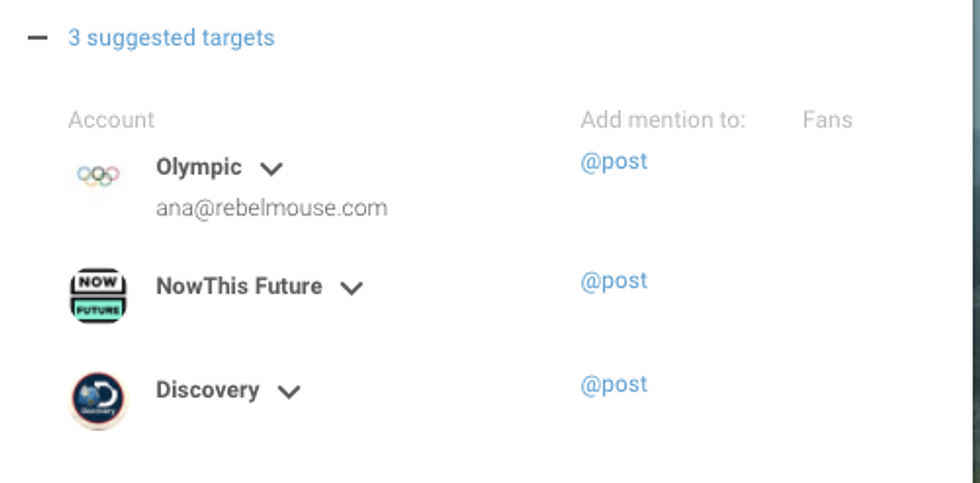
We've taken social sharing one step further. Now, you can connect with influencers in a flash. When you add a Facebook video from a URL, you will automatically see that Facebook video's author as a suggested Facebook target to tag + interact with.
Automated Mentioning
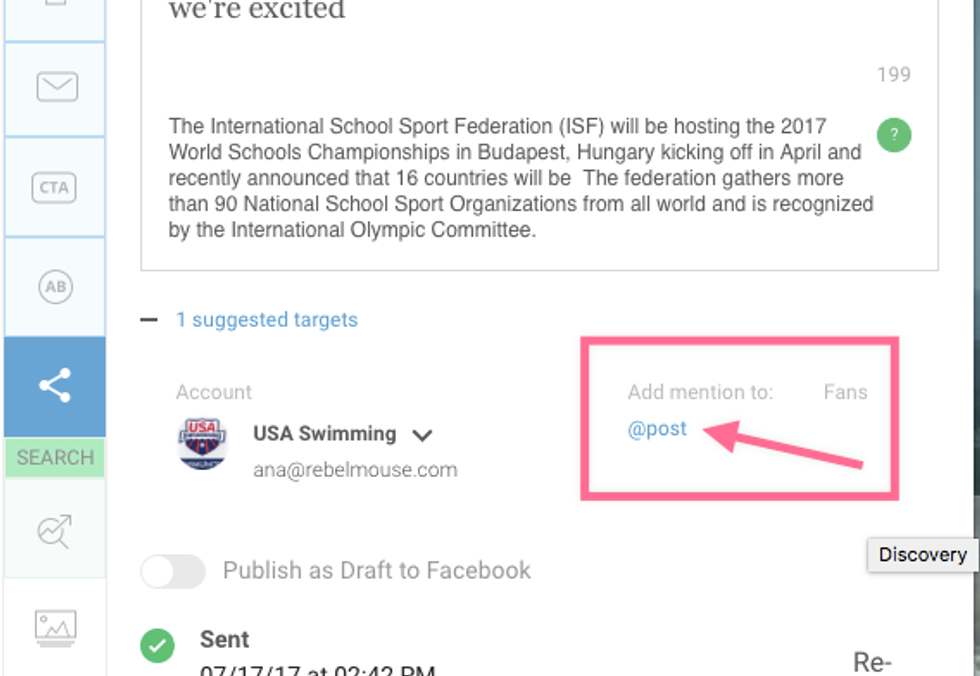
Mentioning the author is fast and simple, thanks to our automated mentioning tool. @mentioning doesn't even have to be typed in. You can simply click to @mention one of the targets we suggested, as shown above.
Multiple Select
If you multiple select several Facebook videos in the Add Media bar, the authors of those videos will show up as suggested targets in the scheduling tool. See it all in action in the video above. 👆
Seamless Publishing
See all the features in action.
Hey there — FYI: The reason we have so many frequent updates is pretty special. RebelMouse is a centralized CMS, so we push out multiple product updates to our site network every day. This is different from decentralized CMS solutions like WordPress, which require updates to be employed to all sites — all 87+ million of them — one by one.


