


Key Takeaways
- Meta titles and descriptions shape your search appearance and your clicks: They decide how your page shows up in results and how compelling it looks, which makes them worth optimizing even when Google adjusts them.
- Length matters: Aim for 50 to 60 characters on a meta title and 150 to 160 on a meta description so they display fully in the results page instead of getting cut off.
- You influence, you do not fully control: Google often generates or rewrites titles and descriptions automatically, drawing on your title tag, H1, and page content, so clear, unique, keyword rich metadata is how you steer the outcome.
- Every page needs unique metadata, and RebelMouse handles the patterns: The platform applies sensible title and description formats per page type (posts, sections, authors, tags, and the home page) with smart fallbacks, so no page is left blank.
It is important to optimize your page titles and descriptions for SEO. Every page should have a unique meta title and description that properly describes what the page is about. These should include relevant information and keywords that are helpful for both users and search engine crawlers to understand the content.
This is how a meta title and meta description may display in Google Search’s results:
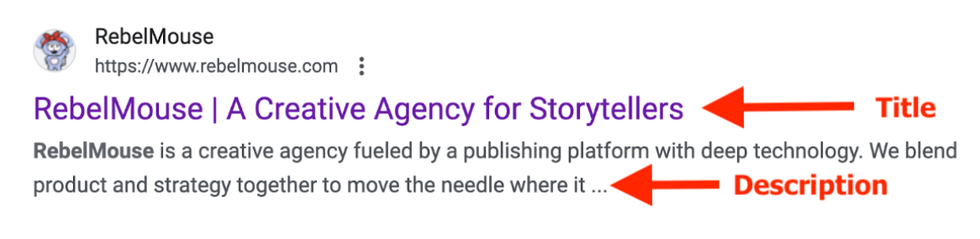
You should know that the title and the description you set may not always display in search results. Google says in its documentation about title links that you can influence what may appear, but ultimately titles are generated in an automated way by the search engine. They say they consider sources like title heading elements like h1 and other content that is large and prominent on the page in setting the title that displays in SERPs (search engine results pages).
Meta Titles
Meta titles are best limited to 50–60 characters so that they fully display in search results. They should be clear in what the page is about and use action words or even pose a question when possible to increase interest and ultimately entice users to click through.
By default, the following are some patterns for meta titles that we recommend:
- Home Page: [Site Name] - [Description of Site; Opportunity for Branding]
- Examples:
- RebelMouse | A Creative Agency for Storytellers
- Brit + Co | Be inspired, get smarter, and feel better every week!
- Narcity - Connect to your city and the world.
- Examples:
- Section: [Section Name] [Summary of Collection] - [Site Name]
- Examples:
- Economy – News Section | Common Dreams
- Artificial Intelligence News & Articles - IEEE Spectrum
- While this format is recommended, you can play around with other variations and edit the title of sections in the Sections Dashboard.
- Examples:
- Tag: Some variation including [Tag Name] - [Site Name]
- Examples:
- Latest about [Tag Name] - [Site Name]
- [Tag Name] News & Updates - [Site Name]
- Examples:
- Post: [Headline] - [Site Name] (this can be edited in the Entry Editor SEO tab under SEO Headline)
- Author: [Author Name]’s Articles - [Site Name]
Meta Descriptions
A meta description is a brief summary of a page’s content. It’s typically limited to 150–160 characters. It should provide a compelling overview that will encourage someone to click through from search results. Be sure to include relevant keywords and secondary or tertiary keywords, but it should also read coherently and cleanly.
- Home: You should come up with a few sentences describing your site for this.
- Section: This can be configured for each section under Description in the Sections Dashboard.
- Summarize the section in a few sentences. Include relevant keywords that describe the section and the types of posts that will appear there.
- If there’s no meta description populated, you should set a default text like “Latest updates about [Section Name] on [Site Name].”
- Tag: [Tag Name] - [Site Name]
- Example: “All about [Tag Name] on [Site Name]: Latest news and updates.”
- Post: Add one or edit it in the SEO tab in Entry Editor under SEO Description.
- If there’s an SEO Headline, we’ll use that.
- If there’s no SEO Headline, we’ll use the subheadline.
- If there’s no subheadline or SEO Headline, we’ll use the first two paragraphs.
- Author: The bio is used to populate the meta description.
- If there’s no bio, you should have a default text display something like “Articles by [Author Name] on [Site Name].”
That’s it! If you have any questions, please reach out to us anytime and we’ll be happy to work with you on optimizing your meta titles and meta descriptions. Learn more about how RebelMouse optimizes websites for search.


