

We always say that there are a lot of pieces that make up the SEO puzzle, and these pieces all play an important role in helping you to succeed across search. While quality content is also helpful — it’s the number one golden ticket to a winning SEO strategy — there’s a lot more that creators need to do to make sure that their quality content is set up for success.
One very important item on your SEO checklist should be the use of internal links.
What Are Internal Links?
Internal links are hyperlinks that connect one page of a website to another within the same domain. Quite literally, it’s just linking to other pages on your site in every post.
Why Are Internal Links Important for SEO?
While it seems simple, internal linking is actually quite important for SEO for a handful of reasons.
Creates Better Indexing: Google’s crawler, often called Googlebot, uses internal links to navigate each website to find and index new content. When Googlebot lands on a page, it will follow the internal links to other pages, which ensures that all of your important content is indexed properly.
Enhances the User Experience: Internal links improve the user experience because they direct users to other related content that could be of interest to them. This helps reduce bounce rates and extends the user journey on your site. Often, a site with a lot of internal links will have higher engagement rates.
Generates Link Equity: A healthy amount of internal links will create what’s called “link equity” for a website. That means if a page has a high page authority, or receives a lot of backlinks (meaning other pages on the web are linking to it), internal links on that page will also receive some of that authority.
Solidifies Site Structure: Internal linking helps reinforce your site’s structure. By organizing your content into categories and linking to related pages, you’re creating an intuitive hierarchy for your site’s content. This will help search engine crawlers understand the relationships between the pages on your site.
What Are The Different Types of Internal Links?
There are a few different types of internal links that you should be aware of. Make sure these links are visible and working properly on your site.
Navigational Links: These links are usually found in a website’s header, and will often be links to pages like “Home,” “About Us,” Contact Us,” or “Services.”
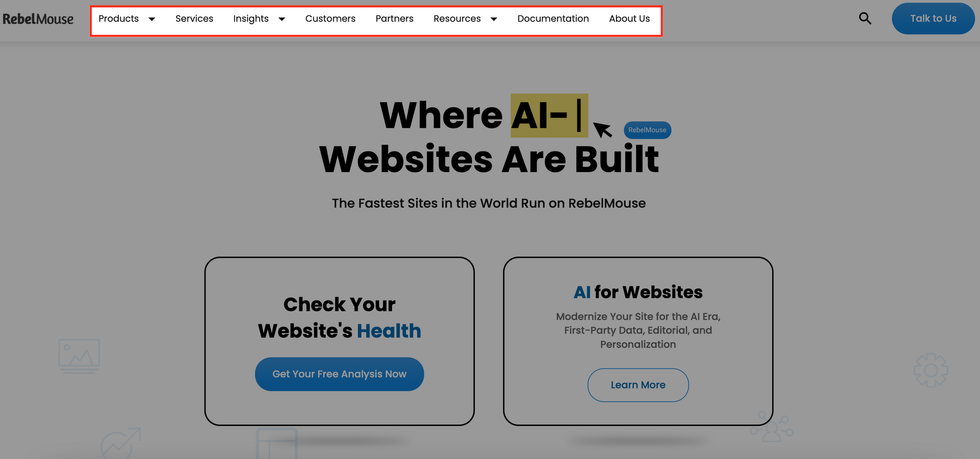
Navigational links on RebelMouse.
Contextual Links: These are links within the content of a page that direct readers to related content. This can be another blog article, product page, or section on your site. These links are often rich with keywords and hyper relevant to the source content.

Contextual links on RebelMouse.
Footer Links: These are links that are placed at the bottom of a web page that often link to pages like privacy policies, terms of services, and other important but not highly visited pages.
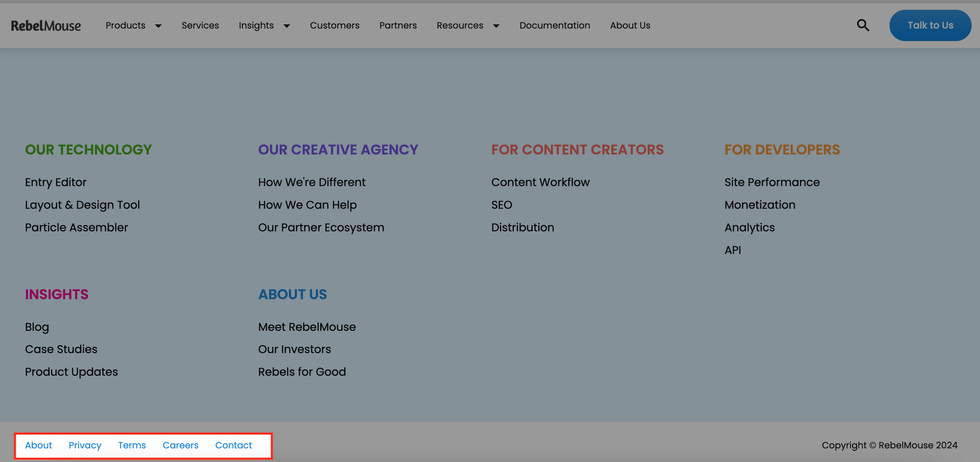
Footer Links on RebelMouse.
What Are the Best Practices for Internal Linking?
While it may seem intuitive to include internal links every time you create content, there are some important best practices that you should keep in mind.
Use Descriptive Text: Make sure the text you’re linking to is descriptive and relevant. This will help search engines understand the content that you’re linking to. For example, if your sentence is “Check out this link for our guide to fall fashion,” the words “fall fashion” should be clickable instead of “this link” or any other words in the sentence.
Only Link to Relevant Content: Make sure each of your internal links is relevant to the original content. Irrelevant or frivolous links could harm your search rankings.
Maintain a Logical Site Structure: Organize your site’s content in a way that’s decluttered and makes sense. It’s a good idea to use categories and subcategories, and make sure they are linked correctly.
Don’t Overlink: Too many links can be distracting and can dilute the value of more important links. Make sure your linking is logical and only helps enhance the user experience.
How Do I Manage My Site’s Internal Linking?
Search tools like Semrush, Ahrefs, and Google Search Console can help you manage your internal linking through data insights, and can help you identify areas for improvement.
RebelMouse is an AI-enabled, cloud-based CMS that has built-in integrations with tools like Semrush and Google Search Console to ensure your content is ready for success across search before it's even published.
Since we are a search-centric CMS, we make adding internal links an easy part of the content creation workflow, which is why we created our SmartLinks Dashboard. This intuitive feature allows users to add links on the fly to all of their key search phrases. For example, imagine you often use the phrase “unicorn colors” in your content. On RebelMouse, you can set a SmartLinks rule that will add an internal link of your choice any time the phrase “unicorn colors” is used across your content.
Here it is in action:
Using features like our SmartLinks Dashboard will make it easy for your content to earn more visibility across search engines.
If you’re interested in learning more about internal linking, or how our CMS can help you make it to the top of Google Search, request a demo today and let’s start working together.


